Build Your Own GitHub Review Bot With Any Agent or Model
Turn any Paperclip agent into a GitHub PR review bot on any model or harness, with scored 1-5 assessments, opt-in merge checks, and full run traces.

Today we are launching GitHub Review Bots in general availability across Paperclip Cloud and self-hosted Paperclip. You can turn any Paperclip agent—running on any supported model or harness, with your repository’s own skills and review rubric—into a dedicated GitHub PR review bot with structured 1–5 assessments, commit-bound check runs, and full task observability.
Most AI pull request reviewers ask you to install someone else’s black box on your repository. Tools like Greptile, CodeRabbit, and Claude Ship pick the model, own the prompt pipeline, and post comments back to GitHub without showing you the full execution trace, what the review cost, or how it maps to the rules your coding agents already follow. Whether you run Paperclip review bots standalone or layer them alongside the review tools you already use, your reviewers now live inside the same control plane as the rest of your agents.
3/5 check, inspect the full run trace and token cost in Paperclip, push a fix, and clear 5/5 for merge.Why standalone AI review bots hit a wall
Engineering teams already maintain repo-specific skills, lint rules, architecture notes, and coding agents tuned to their codebase. Relying solely on a separate SaaS review bot splits that work in two:
- Locked model and harness choices: When a better coding model ships, or when you want a fast reviewer for routine PRs and a deeper one for security-sensitive diffs, you are stuck with whatever single backend the vendor exposes.
- Disconnected rules: Your review bot cannot reuse the skills, instructions, and finding categories your engineering agents already run against the same codebase.
- No run-level visibility: When a review bot flags a false positive or misses an obvious bug, you see a comment on GitHub with no execution trace, no tool log, and no per-PR token or cost breakdown.
A PR reviewer should not have to sit outside the rest of your agent team. It should be an agent you already manage, running under the same budgets, permissions, and audit trail.
Turn any Paperclip agent into a GitHub review bot
In Paperclip, a GitHub bot belongs to one Paperclip agent. GitHub pull requests, inline review threads, and issue mentions enter ordinary Paperclip tasks, and the Reviews view is a projection of the structured assessments attached to those tasks.
Because the bot runs on Paperclip’s existing agent runtime, you keep full control over what powers every review:
- 11 supported harnesses: Run reviewers with Codex, Claude Code, OpenCode, Pi, Antigravity, Cursor, Gemini CLI, Copilot, Hermes, Grok, or Kimi Code.
- Swap models and harnesses anytime: Change the agent’s model, harness, or skills once in Paperclip and every future PR review picks up the change without touching your GitHub App installation or repository rules.
- Your own rubric and finding categories: Configure review instructions and repository-specific finding categories so the agent checks for the failure modes your team actually cares about.
From 3/5 to 5/5 on a real pull request
Here is how a review runs end to end once a bot is connected to your repository.
1. Connect a bot in under a minute
Open the GitHub Code Review Bot connector in Paperclip, pick the agent you want behind the bot, choose your personal GitHub account or an organization, and review the suggested GitHub App name. Click Continue to GitHub, confirm creation, and select the repositories to install it on. Paperclip fills in the App permissions, webhook events, and callback URLs for you, stores the installation credentials, and opens the bot’s Settings once the signed webhook ping is verified.
If you want your bot to show a custom avatar on GitHub comments, download the agent’s PNG avatar from Paperclip and upload it under Display information in your GitHub App’s settings after creation. GitHub’s App Manifest API does not accept avatars during creation, so that step happens in GitHub directly.
2. Catch a defect and publish a commit-bound check
When a PR opens (under automatic triggers) or an authorized teammate mentions @your-bot on a PR, Paperclip starts or continues a Paperclip task for the assigned agent. The agent inspects the PR through task-scoped GitHub tools, explicitly calls begin_review, and submits a structured assessment containing:
- The exact commit SHA reviewed
- A score from
0to5(1for critical defects,3for meaningful defects that need fixing before merge,5when no actionable defects are found within stated coverage) - Structured findings tagged with your configured finding categories
- Rationale and explicit coverage notes
Paperclip validates the assessment on its own side—the agent cannot simply emit an arbitrary passing check, and incomplete coverage cannot pass—then translates the score against your configured threshold (default 5/5, adjustable from 1–5 or report-only) into a real GitHub check run named Paperclip Review.
If the agent catches a real bug and scores the commit 3/5, GitHub shows the inline code findings, the summary comment explaining the verdict, and a red Paperclip Review check bound to that commit.
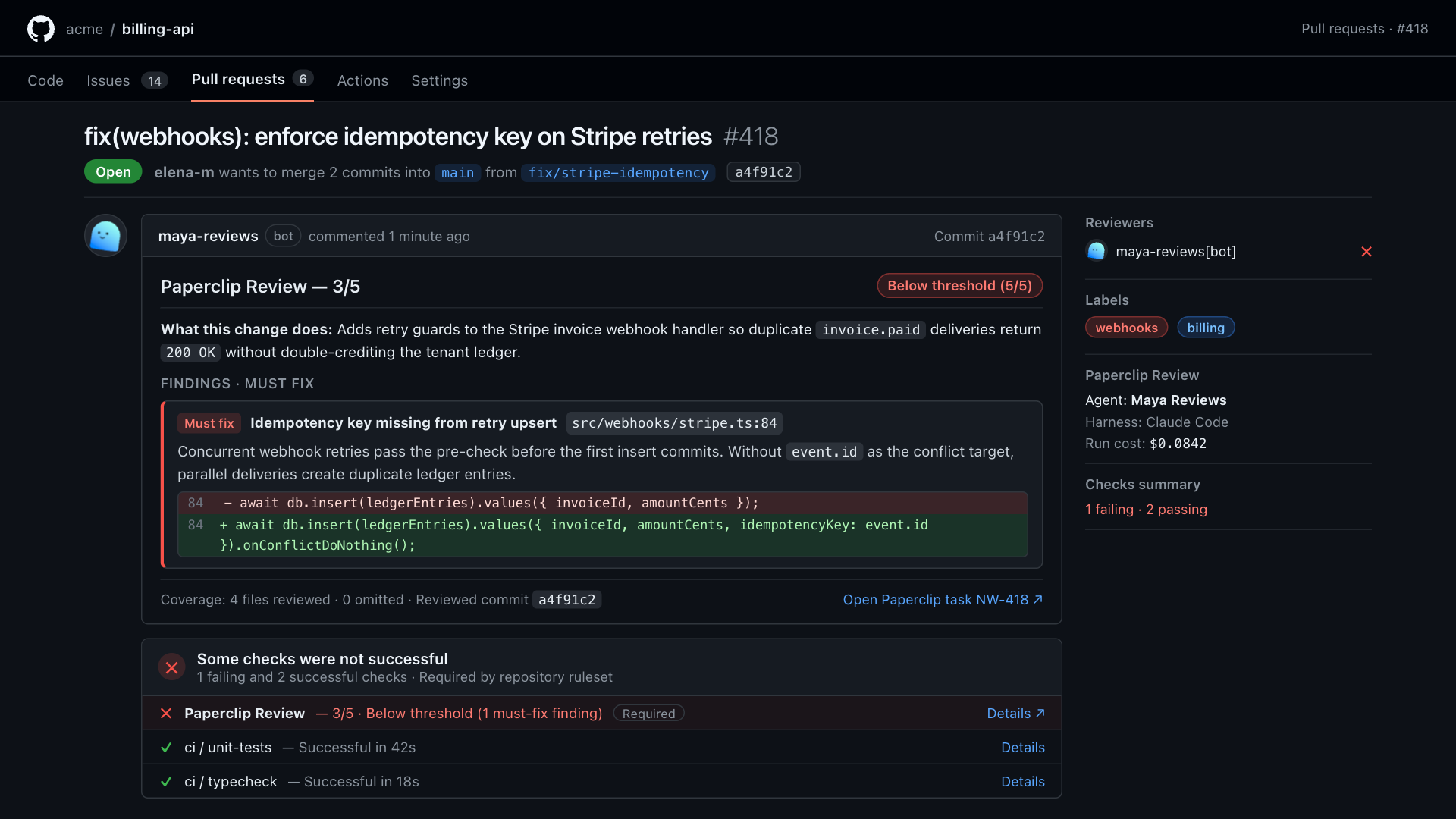
3/5 assessment tied to commit a4f91c2 with exact file-and-line diff evidence, coverage summary, a Paperclip task link, and a failing Paperclip Review check run.3. Open the run trace and cost in Paperclip
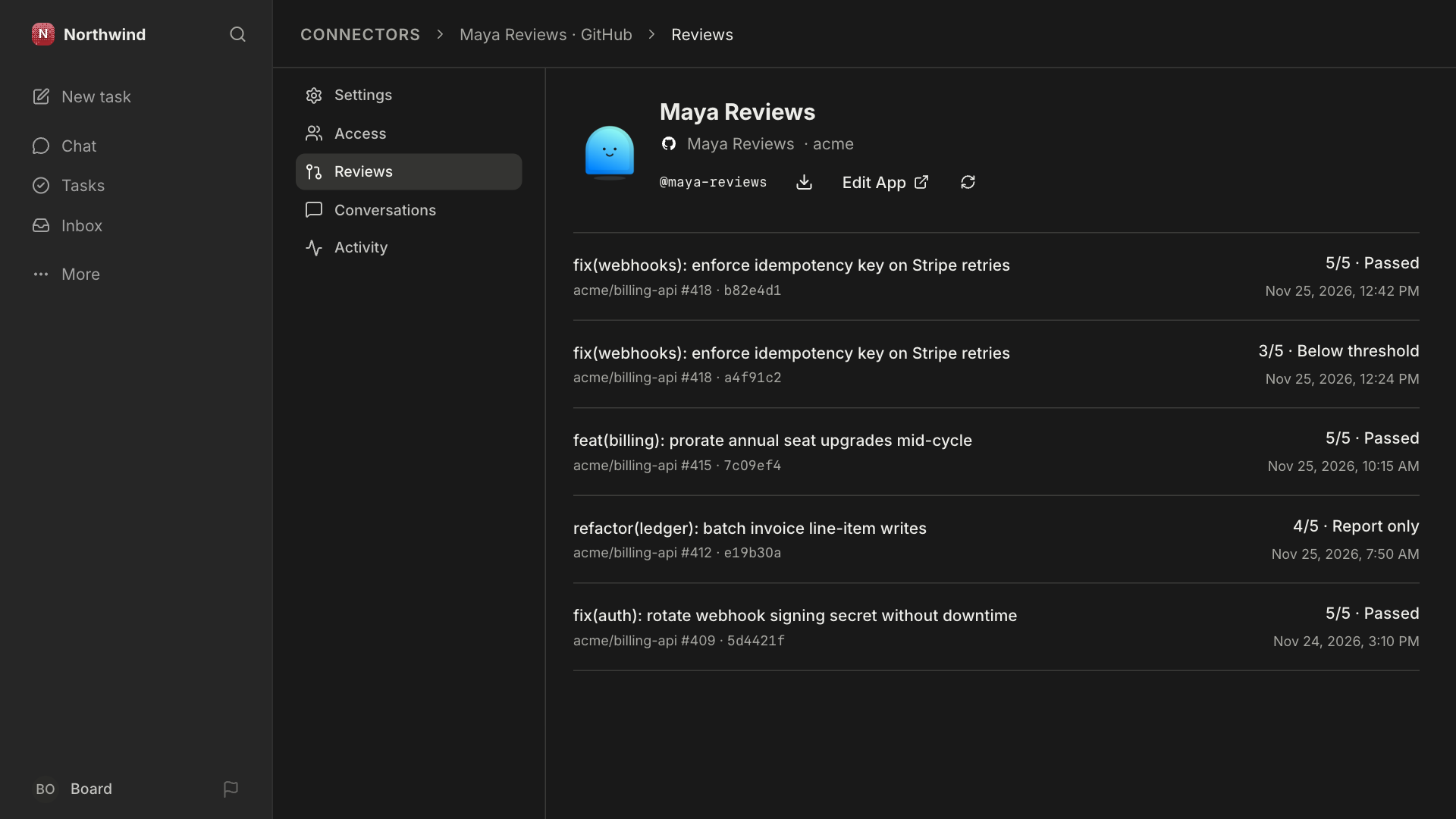
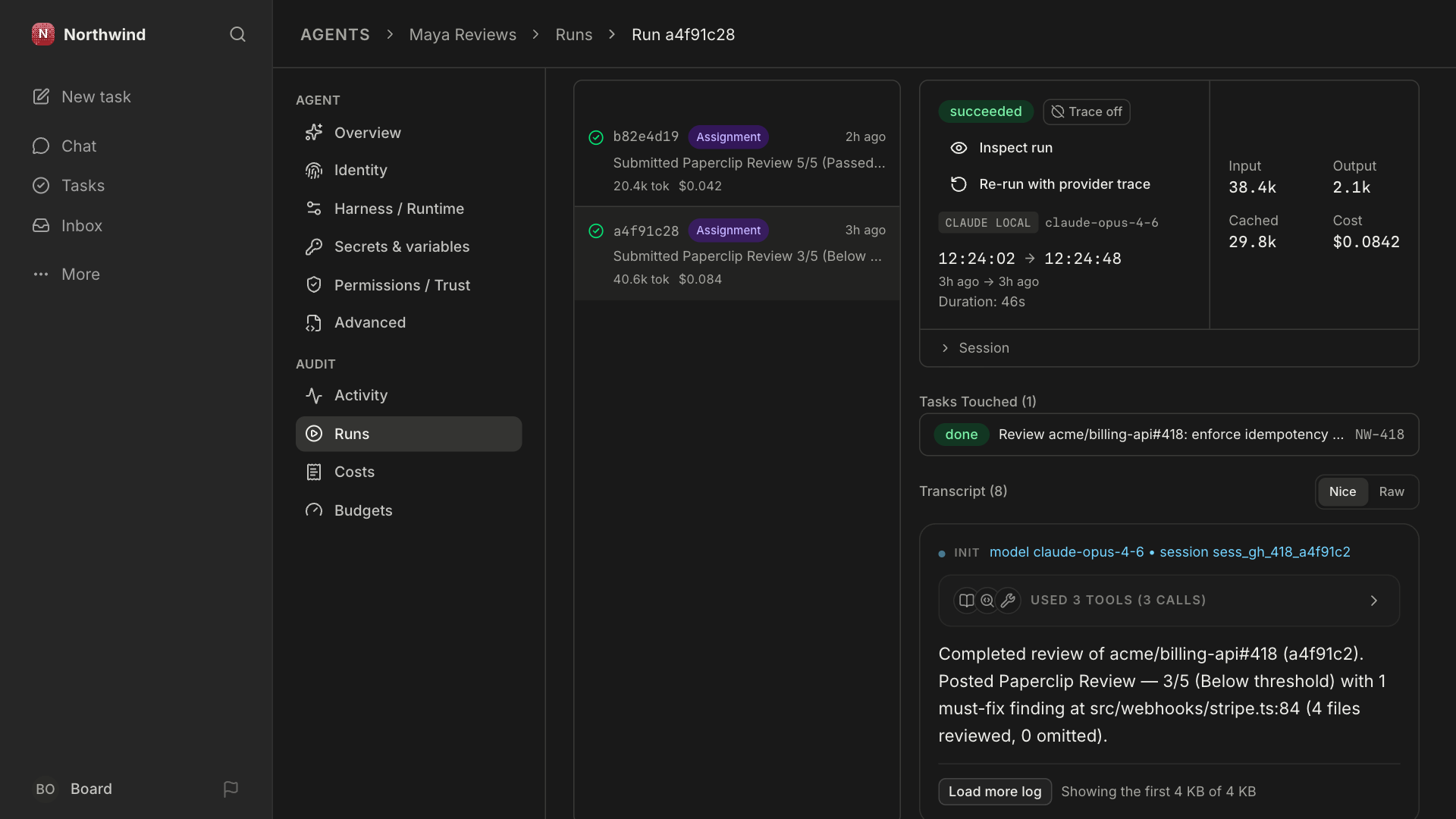
Click Details on the GitHub check—or open the bot’s Reviews tab in Paperclip—to inspect the exact run behind the review. You see the full execution trace, tool calls, reviewed commit, findings, coverage limits, and token spend in one place. Every review has its own permalink, and the conversation stays attached to the same Paperclip task for the life of the PR.
4. Push a fix and re-review HEAD
A check result belongs only to the commit it assessed; an older passing result never stands in for newer code, and older runs cannot overwrite the latest head. When you push a fix commit, Paperclip either triggers a fresh review automatically (if updated-commit reviews are enabled) or waits for an authorized @your-bot mention.
The bot evaluates the new HEAD in the same Paperclip task, updates its single summary comment in place instead of spamming new top-level comments, avoids duplicating previously posted inline findings, submits a complete 5/5 assessment, and flips Paperclip Review green.
Dedicated App identity without GitHub Actions boilerplate
GitHub Review Bots do not require a .github/workflows/*.yml file in your repositories, and bot actions never run under your personal GitHub token.
- Dedicated GitHub App identity: Each bot has its own App installation, its own
@app-slugmention, and short-lived installation credentials scoped strictly to the repositories you enable in both GitHub and Paperclip. - Cloud and self-hosted, including localhost without tunnels: On Paperclip Cloud, webhooks route directly through your deployment. On self-hosted and local instances, an enrolled Paperclip Cloud connector acts as a sealed transport gateway that forwards signed GitHub webhook bytes over outbound requests—no ngrok or public inbound tunnel required. Direct public-HTTPS webhook connections remain supported if you prefer to host ingress yourself.
Three independent choices from mentions to merge gates
Installing a review bot should not lock down a repository before your team has seen how it behaves. Paperclip keeps three decisions completely separate:
- Installing the GitHub App grants repository access and delivers webhook events to Paperclip.
- Configuring triggers in Paperclip decides when those events wake the agent—mentions only (
@your-bot), automatic reviews on selected PR events (opened, reopened, ready for review, updated commits), or both. - Requiring the check in GitHub decides whether a failing review blocks merging.
Scroll horizontally to see all columns
| Review trigger in Paperclip | GitHub requires Paperclip Review? | What happens on a PR |
|---|---|---|
| Mentions only | No | Optional review when an authorized user asks. A failing check does not block merging. |
| Automatic | No | Every eligible PR gets automatic feedback. A failing check does not block merging. |
| Mentions only | Yes | Merging waits until someone requests a review and the Paperclip Review check passes. |
| Automatic | Yes | Reviews run automatically and merging waits for Paperclip Review to pass. |
Installing a bot or enabling automatic reviews never modifies your GitHub branch protection or rulesets. Merge gating is strictly opt-in in GitHub: once the bot has published its first check, a repository administrator opens Settings → Rules → Rulesets, edits the rule targeting main, enables Require status checks to pass, and adds Paperclip Review (selecting your bot App as the expected source where supported).
Formal GitHub Approve and Request changes reviews are also separate governed tools, both disabled by default. A 5/5 assessment never automatically approves a pull request, so you can require the bot’s check while still keeping final merge approval with a human reviewer.
Access controls and low-trust review agents
Repository content and PR descriptions are untrusted input—they cannot escalate tool authority or override publication policy. Paperclip enforces who can trigger work on both sides:
- Linked members: Teammates connect and confirm their own GitHub accounts; administrators cannot assert another user’s identity by typing a username.
- Sponsored external contributors: To let an unlinked GitHub user trigger the bot, you add their verified GitHub account explicitly with an active sponsor and a restricted guest profile. Authority is re-checked before tool calls and publication.
- Low-trust review agents: When you select a standard-trust agent during setup, Paperclip surfaces a warning with an option to switch it to a low-trust review agent. Saving the low-trust preset applies policy defaults, while setting up an isolated sandbox and scoped task boundary for untrusted PRs is a separate runtime configuration step on self-hosted instances.
Get started
GitHub Review Bots are live now in Paperclip Cloud and self-hosted Paperclip:
- Open the GitHub Code Review Bot connector in Paperclip and choose the agent you want to review PRs.
- Complete the guided GitHub App creation flow and enable your first repository in Access.
- Start in mentions only mode, ping
@your-boton an open PR, and inspect the assessment and run trace in Reviews. - When you are ready to enforce reviews on
main, turn on automatic triggers in Settings and opt in to Require status checks to pass → Paperclip Review in your GitHub Rulesets.
Read the full walkthrough, permissions model, and self-hosted setup details in the GitHub Review Bots setup docs, or get started at paperclip.ing.