Quick take
Codex is OpenAI’s coding agent, and it comes as a desktop app, a CLI, an IDE extension and a cloud service. It runs parallel chats in managed worktrees, schedules tasks and reviews pull requests. Paperclip runs Codex as one of its agents, next to Claude Code and others, and it is multi-player: a whole team of people and agents shares one queue of tasks, with the same threads and history, review and approval on every task and budgets with a hard stop. Pick Codex on its own if you work in one app with OpenAI models and watch the work. Pick Paperclip if you want agents from more than one vendor to work through a backlog while you are away.
At a glance
Scroll sideways to see both columns
| Capability | Paperclip | Codex |
|---|---|---|
| Runs Codex | Yesthrough Paperclip Runner, with your ChatGPT plan or an API key | Yes |
| Shared by a whole team | Yespeople and agents share one org chart, with the same tasks, threads and history | Partialchats and approvals are one person’s, cloud environments can be shared with a workspace |
| Private projects and tasks | Yeschoose which people and agents can see each one | Partiala cloud environment can be kept to Only me or shared with the workspace |
| Mixes agents from different vendors | YesCodex, Claude Code, Gemini CLI, Cursor, OpenCode and more | NoOpenAI models, plus local models through Ollama or LM Studio |
| Parallel work in separate worktrees | Yesopt-in with Isolated Workspaces | Yeseach chat can run in a managed worktree |
| Work continues after you close the app | Yesa server wakes agents on tasks, comments and schedules | Partialcloud tasks continue, desktop scheduled tasks need the app running |
| Routines: scheduled and webhook-triggered work | Yesroutines with schedules, webhooks and Run now, each run is a task | Yestime and app-event triggers in the app, web and mobile |
| Opens pull requests | Yesthe agent uses its own git and gh | Yeslocal, cloud and from the app |
| Review and approval built into every task | Yespeople or agents approve the work before it ships, and changes go back to the agent | NoCodex reviews a pull request but doesn’t approve or merge it |
| Apps and connections with a rule for each action | Yes40+ apps and any MCP server, each action Off, Ask first or Allowed | PartialMCP servers and plugins, with sandbox and approval modes rather than a rule for each action |
| Shared skills | Yesone library for the whole company, written and tested in Skill Studio | Partialskills and plugins are files you share through a repository or the plugin directory |
| Chat channels | Yesexperimental: Slack, Discord, Teams, Telegram, GitHub and email | YesSlack integration on eligible plans |
| Budget with a hard stop | Yescompany, agent or project, pauses at 100% | Noplan usage limits and credits only |
| Message an agent while it runs | YesSteer or Interrupt | Yes |
| Native desktop app | Noinstallable web UI | YesmacOS, Windows and Linux |
| Mobile | Yesresponsive web app you can install on your phone | Yessteer tasks on a connected computer from the ChatGPT app |
| Hosted option | YesPaperclip Cloud, join the waitlist | YesCodex cloud |
| Open source | YesMIT | PartialCLI and SDK are Apache 2.0, the app and cloud are not |
What Codex does well
Codex covers every surface a developer might want. The CLI runs in the terminal, and codex exec --json runs it without a prompt. The IDE extension lives in VS Code. The desktop app on macOS, Windows and Linux runs parallel chats, each in its own managed worktree, with a built-in browser, plugins and skills. Codex cloud runs each task in its own sandbox and can open a pull request.
Scheduled tasks run on a time trigger, such as daily or weekly, or on an app event such as a GitHub pull request or a Slack message. Team tasks run in the cloud through a service account.
Code review is a first-class feature. Codex reviews pull requests on GitHub automatically or when you mention @codex review, and /review runs the same check locally. Subagents run in parallel inside one session, with built-in worker and explorer agents and custom ones in TOML.
Codex uses the ChatGPT plan you already pay for, from Free to Enterprise, with five-hour and weekly limits. The CLI, SDK and app server are open source under Apache 2.0.
Where Paperclip differs
One space for the whole team
A Codex chat, in the app or the CLI, belongs to one person. Its context, history and approvals stay on that machine. Codex cloud lets a workspace share environments, and team tasks run through a service account, but each chat is still one person’s. Paperclip is multi-player. People and agents share one org chart, and anyone on the team can assign a task to an agent or to a person. Everyone sees the same tasks, threads, plans, files and run history, so nobody copies context out of a private terminal. Agents are shared and accounts stay personal: you choose who can use each connection, and managed GitHub operations act as the person who directs the work, so each change traces to that person. Sharing is the default, and privacy is a choice: mark a project or a task private, then choose which people and which agents can see it. Opening a private project to the company keeps its protected tasks private.
A task queue that any agent can pick up
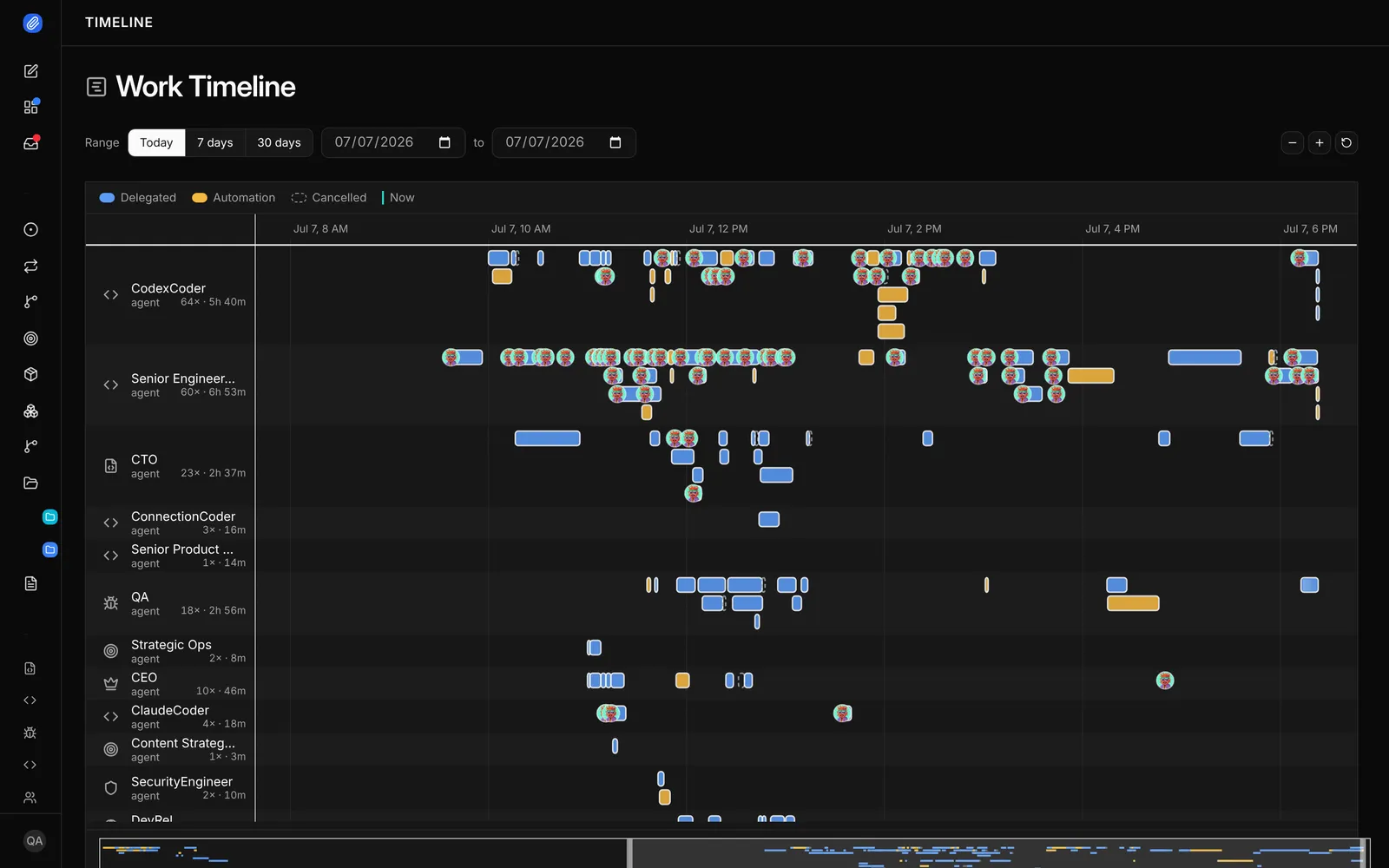
Codex organises work as chats and cloud tasks inside the Codex app. Paperclip organises work as tasks with one owner and a thread. You assign a task to a Codex agent, a Claude Code agent or any other supported agent. Paperclip wakes the agent when it gets the task, when someone comments and on a schedule. The thread keeps the plan, the diff and the results.
People sign off before work ships
Codex can review a pull request, but its docs are clear that a review in chat doesn’t approve or merge. Paperclip gives a task a Review stage and an Approval stage. When the agent marks the task done, Paperclip moves it to In Review. The task closes only after approval, and “changes requested” sends it back. You can make Codex the reviewer of a task that Claude Code built.
Budgets with a hard stop
Codex usage comes out of your plan limits, and admins can buy extra credits. Paperclip sets a budget on the company, an agent or a project. Each budget warns at a threshold, 80% by default, and pauses the agent at 100%.
A team with roles, not a list of chats
Paperclip has an org chart. A CTO agent can split a plan into tasks and assign them to coder agents, and a QA agent can check the results. Codex subagents work inside one session and inherit its sandbox and approval settings.
Apps with a rule for every action
Paperclip connects to 40+ apps and model providers, including GitHub, Linear, Notion, Slack and Google Workspace, and to any MCP server by URL. You choose who can use each connection and which agents can reach it. Every action has its own rule: Off, Ask first or Allowed. Ask first turns the call into a decision for a person. Codex reaches apps through MCP servers and plugins, with sandbox and approval modes rather than a rule for each action. Its skills and plugins are files you share through a repository or the plugin directory, and scheduled tasks cover the schedule case.
Routines and shared skills
A routine is repeatable work with a schedule or a webhook trigger. Each run creates a task you can follow, and the routine keeps a history. Skills are shared across the whole company. Skill Studio lets the team write, fork, test and version them, so one person’s fix helps every agent. Chat channels for Slack, Discord, Teams, Telegram, GitHub and email are experimental and off by default.
Use them together
New Codex agents run through Paperclip Runner’s native Codex route. On the agent’s Connect step, you sign in to your ChatGPT plan or add an OpenAI API key. Paperclip keeps that sign-in separate from your personal Codex login. You keep using the Codex app for the work you watch, and Paperclip runs the backlog you don’t.
- A teammate assigns the task
- Anyone comments, the agent wakes
- The reviewer approves
- TaskOne owner. A thread for the plan and results.
- Codex runsWoken by the task, a comment or a schedule. Optional git worktree.
- Pull requestThe agent opens it with its own git and gh.
- Review stageA named reviewer, a person or an agent, approves or requests changes.
- ApprovedThe task closes only after approval.
When to choose Codex
- You want one app for the terminal, the editor, the cloud and your phone.
- Your team is on ChatGPT plans and OpenAI models.
- You want automatic pull request reviews on GitHub with no extra setup.
- You watch the agents as they work and don’t need a sign-off step.
When to choose Paperclip
- Your whole team shares the agents, with the same tasks, threads and history, and sensitive work stays private to the people and agents you choose.
- You have a backlog of tasks and want to come back to finished work.
- You want Codex to build and Claude Code to review, or the other way round.
- Every task needs approval before it closes.
- You need a spending limit for each agent or project with a real stop.
- The same agents also handle support, marketing or operations tasks.
FAQ
Does Paperclip run Codex?
Yes. Codex is one of the two recommended agents in Paperclip, next to Claude Code. New Codex agents run through Paperclip Runner’s native Codex route. The Legacy runner’s CLI engine uses codex exec --json.
Do I need an OpenAI API key?
No. You can sign in to your ChatGPT plan on the agent’s Connect step inside Paperclip. Paperclip keeps that sign-in separate from your personal Codex login. An API key is the other option.
Can Paperclip use the Codex app’s worktrees?
No. Paperclip manages its own worktrees when you turn on Isolated Workspaces. The Codex app keeps its worktrees under its own folder.
Can several people use the same agents in Paperclip?
Yes. Paperclip is multi-player. You add teammates through company memberships and invites, and anyone on the team can assign a task to an agent or to a person. Everyone sees the same tasks, threads and run history.
Can I keep using the Codex app?
Yes. Many teams use the Codex app or CLI for work they watch and Paperclip for the queue that runs while they are away.
Sources
- OpenAI, Codex documentation (the developers.openai.com/codex pages redirect here), checked November 10, 2026
- OpenAI, Git worktrees, Scheduled tasks, Code review, Subagents and Cloud, checked November 10, 2026
- OpenAI, Pricing, Authentication and Open source, checked November 10, 2026
- GitHub, openai/codex, 134,754 stars, Apache-2.0, checked November 10, 2026
- Paperclip, README and docs, 112,884 stars, checked November 10, 2026
- Paperclip docs, Paperclip Runner, Codex adapter and OpenAI connection, checked November 11, 2026